How to Choose the Right UPS Power Supply for Your Needs?

Choosing the right UPS power supply is critical for any business or home office. According to Jack Thompson, a UPS power expert at SecurePower Solutions, "A reliable UPS can be the difference between a minor inconvenience and a major loss." His insights emphasize the need for careful selection.

In today’s digital age, power outages can disrupt operations unexpectedly. Selecting the right UPS power supply ensures your devices stay operational. Features such as capacity, runtime, and connectivity options are crucial. Less experienced users might underestimate these factors, leading to poor performance.

Understanding your specific power needs is essential. Not all UPS systems are the same, and each has unique specifications. Some users may default to the cheapest option. However, investing in quality often provides better reliability. Reflecting on your requirements and future expansion plans can pave the way for a smart decision.
How to Choose the Right UPS Power Supply for Your Needs?

Understanding the Basics of UPS Power Supplies

When selecting a UPS power supply, understanding its fundamentals is crucial. UPS, or Uninterruptible Power Supply, serves as a backup during power outages. It protects your electronic devices from sudden shutdowns. The main types of UPS are offline, line-interactive, and online models. Each type has unique advantages suited for different needs.

Capacity is a key consideration. Determine your equipment's total wattage. This figure helps choose a UPS that meets your requirements. For instance, a small home office may need a lower-capacity unit than a server room. Additionally, runtime is important. Some devices require longer backup time for safe shutdowns. Often, users underestimate their need for extra capacity.

Consider the features that enhance reliability. Look for options like surge protection and battery replacement alerts. These elements ensure a consistent power supply. However, not all features may be necessary for everyone. Some may become overwhelmed by the choices available. Researching extensively can help eliminate confusion. Ultimately, a simple approach often works best when selecting the right UPS for your setup.

Identifying Your Power Needs and Equipment Requirements

Understanding your power needs is crucial when selecting a UPS power supply. Identify the total wattage of your equipment. This includes servers, networking devices, and lights. A common mistake is to underestimate needs. According to a survey by TechTarget, 40% of IT professionals miscalculate their power requirements, leading to inadequate backup.

Consider the runtime you need. This duration refers to how long the UPS will support your equipment during an outage. The National Institute of Standards and Technology (NIST) suggests calculating runtime based on your equipment's power consumption and desired backup duration. A 1500VA UPS typically supports about 800-1000W for 15-20 minutes. This might not be enough for mission-critical systems.

Evaluate the features of the UPS as well. Look for battery management and voltage regulation. These features enhance reliability. Also, ensure it fits into your equipment layout. An improperly sized UPS can lead to heat issues or space inefficiencies. Balancing these factors requires careful thought. Many overlook this, which can create long-term challenges.

Evaluating UPS Types: Standby, Line-Interactive, and Online

When choosing a UPS power supply, understanding the various types is essential. Standby, line-interactive, and online UPS systems each serve different needs. A standby UPS activates during power outages. It can safeguard small electronics, making it a cost-effective choice.

Line-interactive UPS systems provide improved regulation. They handle voltage fluctuations effectively. This type is suitable for sensitive equipment, like computers and network devices. They can adjust voltage without switching to battery, enabling longer battery life. For critical systems, they may be a wiser investment.

Online UPS systems offer the highest level of protection. They provide a continuous power supply, converting incoming AC to DC and back to AC. This ensures zero transfer time. However, they can be more expensive and may produce more heat. It's crucial to weigh the significance of your equipment's safety against your budget.

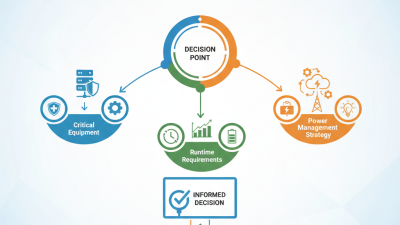
Tips: Identify the critical equipment you need to protect. Assess how long you want backup power during outages. Remember, consider the total wattage. Don’t overlook the importance of regular maintenance to ensure longevity. Choosing the right UPS can make a noticeable difference in operational reliability.

Determining Battery Capacity and Runtime for Your Devices

Choosing the right UPS power supply involves understanding how much battery capacity you need. This capacity dictates how long your devices can run during a power outage. Start by identifying the total wattage of your equipment. Gather the wattage for each device and add them up. This total power requirement will guide you in choosing the right UPS model.


Runtime is equally important. It defines how long your UPS can support your devices during an outage. Many manufacturers provide runtime charts. These charts show the expected runtime based on the load. For example, a UPS might last for 10 minutes at full load but could extend its runtime to an hour with a reduced load. It’s crucial to consider your usage patterns when selecting a UPS.


Tip: Always plan for additional devices in the future. You may need to add equipment later. A UPS that meets your current needs may fall short later on. Another tip is to factor in the power factors. Some devices consume more power than what their rating suggests. Always round up your calculations to ensure adequate capacity. Remember, a UPS is an investment in your equipment's safety.

Considering Additional Features and Budget Constraints

When selecting a UPS power supply, considering budget constraints and additional features is crucial. Reports indicate that nearly 45% of consumers underestimate the cost of ownership. It often includes maintenance and energy consumption over time. Therefore, evaluating the total cost is essential. A cheaper model might seem appealing, but it can lead to higher operational costs down the line.

Moreover, many users often overlook advanced features like automatic voltage regulation and smart battery management. While these features increase the initial investment, they significantly enhance reliability. For instance, devices with smart management can improve battery life by up to 30%, as noted in recent studies. Conversely, neglecting these features may lead to more frequent replacements and downtime.

Incorporating robust safety features is another consideration. Some UPS devices come equipped with surge protection, which can prevent costly damages to connected equipment. Yet, many still choose models without these protections due to perceived higher costs. This approach can backfire, leading to significant repair bills. Budgeting for the right UPS requires a balance between upfront costs and long-term benefits.

UPS Power Supply Comparison