How to Choose the Right UPS Power Supply?
Choosing the right ups power supply is not a simple matter of comparing battery capacity or purchase price. It is a risk decision. A small office may need protection from brief voltage dips, while a hospital, factory, or data center may require continuous power, redundancy, and controlled shutdown. The wrong unit can leave servers clicking off, alarms sounding, and critical processes stopping within seconds.
The Uptime Institute’s 2024 Annual Outage Analysis reported that 53% of respondents experienced an outage costing more than $100,000. About 16% reported losses above $1 million. These figures show why load type, runtime, maintenance, and scalability deserve careful evaluation. Patrick Donovan, a data-center infrastructure specialist at Schneider Electric, has described the UPS as “the heart of the data center.” That comparison is useful. The UPS must support the system, not merely fill a specification sheet.
Look beyond VA ratings. Measure the real wattage of connected equipment, including startup demand and future expansion. Check whether the design needs standby, line-interactive, or online double-conversion technology. Consider battery chemistry, ambient temperature, bypass arrangements, monitoring, and service access. IEC 62040 guidance and the manufacturer’s test data can provide a stronger basis than marketing claims.
The details matter.
A thoughtful choice also admits uncertainty. Published runtime figures often use ideal loads and new batteries. Actual conditions may differ. This guide examines the evidence, common design mistakes, and practical selection criteria, helping readers choose a dependable ups power supply without paying for capacity they cannot use.
Define Your Equipment’s Power and Backup Requirements
How to Choose the Right UPS Power Supply?
Define Your Equipment’s Power and Backup Requirements
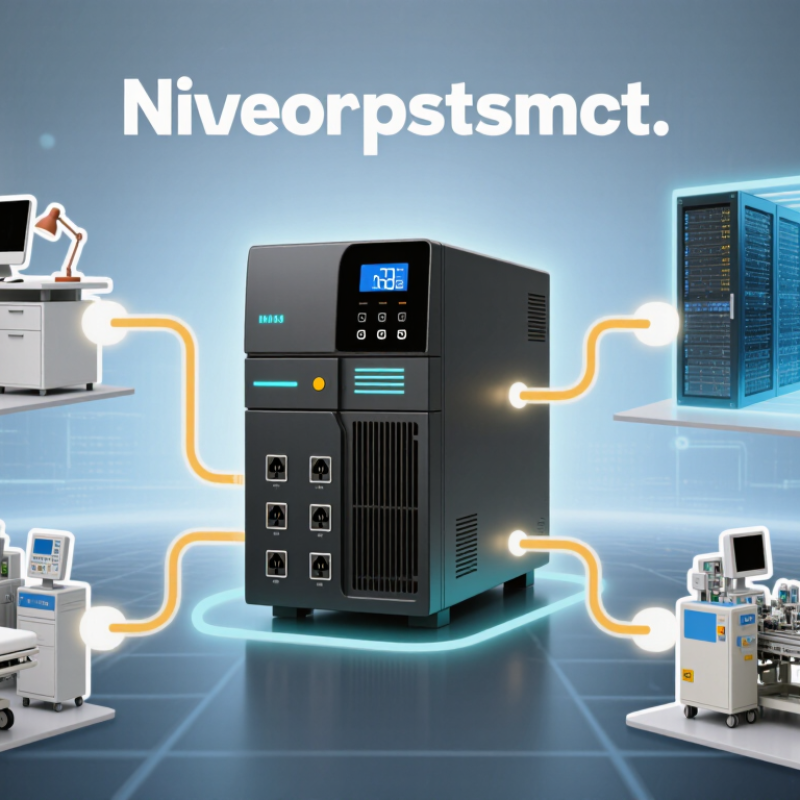
Begin with every device that must remain powered during an outage. Include servers, monitors, network equipment, storage systems, and cooling fans. Record each device’s wattage from its label or technical manual. Do not estimate too casually. Small errors can reduce runtime and overload the UPS.
Add the wattage figures together, then allow a safety margin of about 20 to 30 percent. This headroom supports startup surges and future equipment changes. Check both watts and volt-amperes, because a UPS must handle apparent power as well as real power. A desktop system may draw 300 watts but require a higher VA rating. Critical equipment should connect to battery-backed outlets, while printers and desk lamps may not need them.
Decide how long the equipment must operate. Five minutes may allow a controlled shutdown, while an hour may support network access during short interruptions. Runtime depends on the load, battery condition, temperature, and UPS efficiency. I once saw a carefully sized system fail its runtime test because an extra monitor was connected later. That mistake was avoidable, but common. Test the actual load with a power meter, and repeat the check after installation. Batteries also age, so review the expected runtime periodically rather than trusting the original specification.
Compare UPS Topologies and Operating Modes
How to Choose the Right UPS Power Supply?
Choosing a UPS begins with its topology, not its advertised capacity. In field assessments, I compare how each design reacts to voltage dips, outages, and unstable frequency. An offline UPS suits basic devices where short transfer times are acceptable. It normally passes utility power directly, then switches to battery during failure. That switch may be harmless for a monitor, but sensitive control equipment can reset. Simple is not always safer.
A line-interactive UPS adds voltage regulation, reducing battery use during mild brownouts. It fits offices, network cabinets, and equipment with moderate power sensitivity. However, its correction range and transfer behavior still require checking. An online double-conversion UPS continuously rebuilds power through rectification and inversion. The load receives stable output, with no transfer interruption in normal operation. This topology handles poor grid quality well, but it creates more heat, uses more energy, and costs more. Do not choose it automatically.
Operating mode matters as much as topology. Normal mode prioritizes protection, while eco mode can improve efficiency by bypassing conversion under acceptable conditions. That saving may introduce a small transfer delay. In practice, I review load tolerance, battery runtime, crest factor, bypass limits, and generator compatibility. Test the UPS with the real load, not only a nameplate estimate. A failed assumption is expensive. I have seen users oversize systems, causing low-load inefficiency and battery neglect. Schedule battery inspections, verify alarms, and record transfer tests. Specifications guide selection, but measured behavior earns trust.
Calculate the Required Capacity and Runtime
Choosing a UPS begins with measured demand, not the nameplate alone.
Record each device’s watts or volt-amperes, then add the loads that must remain online. Convert VA to watts when possible, because power factor changes the result. For example, a server rack drawing 2,400 watts at 0.9 power factor needs about 2,667 VA. Add 20–30% spare capacity for startup surges, battery aging, and future equipment. This margin is practical, but I sometimes make it too generous and pay for unused capacity.
Runtime requires a separate calculation.
Estimate the protected load, battery voltage, amp-hour rating, and inverter efficiency, then apply the manufacturer’s discharge curve. A rough estimate is runtime = usable battery watt-hours × efficiency ÷ load watts. A 4,000 Wh battery, 85% efficiency, and 2,400-watt load provide about 85 minutes before derating. Real conditions differ. Heat, battery age, and frequent discharges reduce that figure.
Check the result against operational evidence.
The Uptime Institute’s 2023 Global Data Center Survey reported an average power usage effectiveness of 1.58, showing that supporting infrastructure adds meaningful electrical demand. The International Energy Agency reported that data centers used about 240–340 TWh globally in 2022, reinforcing the value of accurate load measurement. Test the UPS with the actual rack, not an empty bench. Keep records. A calculation can look professional and still be wrong.
Evaluate Battery Types, Features, and Maintenance Needs
Choosing a UPS power supply starts with its battery chemistry, not its front-panel display. Valve-regulated lead-acid batteries cost less and suit controlled rooms. They are heavy, occupy more space, and often need replacement within three to five years. Lithium-ion batteries usually offer longer service life, smaller footprints, and better monitoring. Their higher purchase price still requires careful fire-safety planning.
Look beyond runtime.
Check recharge speed, temperature tolerance, modularity, bypass design, and network alarms. A UPS may support ten minutes of backup, yet fail your needs during repeated power events. Uptime Institute’s 2023 Global Data Center Survey reported that
60% of respondents experienced an outage during the previous three years.
Power-related failures remained a major cause. That figure makes maintenance more than a calendar task.
Measure battery voltage, internal resistance, temperature, and discharge performance. Record trends, not isolated readings. The IEEE 1188 maintenance guidance recommends regular inspections and capacity testing for stationary lead-acid batteries. Follow the manufacturer’s limits and qualified electrical procedures. Lithium-ion systems also need battery-management data and clear replacement controls. I have seen teams trust software alarms too much. Sensors drift. Human checks still matter. A practical schedule combines monthly visual inspections, periodic electrical testing, ventilation checks, and documented load tests. Missing one inspection can expose a weak battery only when the utility fails.
Select the Right UPS Based on Installation and Budget
Choosing the right UPS starts with the installation, not the product brochure. A small office may need a compact standby or line-interactive unit for computers, routers, and storage devices. A server room often requires an online UPS, bypass maintenance, and a rack-mounted design. Check voltage, phase, plug types, heat, noise, and available floor space. Do not size from nameplate watts alone. Measure real load and allow at least 20% headroom.
Budget needs a wider view. The purchase price is only one part of ownership. Add batteries, installation, testing, ventilation, monitoring, and eventual replacement. A cheaper unit can become expensive after repeated battery changes. It may also lack remote alerts or safe maintenance access. Uptime Institute’s 2024 Global Data Center Survey reported that more than half of respondents experienced an outage costing over $100,000. The figure is not universal, but it shows why protection should match business risk.
Efficiency also matters. The International Energy Agency’s Electricity 2024 report estimated that data centers used about 240–340 TWh of electricity in 2022. A UPS with high operating efficiency can reduce wasted power and cooling demand. Still, efficiency claims need careful checking. Compare performance at your normal load, not only at full capacity. I would also test runtime assumptions with batteries aged in real conditions. A ten-minute estimate can feel optimistic when temperature, load growth, and battery condition are ignored. Choose enough resilience for the installation, but avoid paying for capacity that will remain unused.